Memo:SEIL x86 on ProxmoxにGoBGPでルートを注入してみる話
Disclaimer
私的かつラボ環境での実験です。
結論
10万経路を超えた辺りで溢れた。
509 Sep 23 02:44:25 error route bgpd[4901]: calloc : can't allocate memory for size 64: Cannot allocate memory
BGPが不安定なときでも、コンソールは問題なく使えていたのがとても良き。
背景
- IPv4がついに100万経路を超えたらしい。
- SEILを使ってBGPを喋る機会がありそうなので、やってみるなり。
構成
- GoBGP:AS65001
- 今回はGoBGPを用いてフルルートを注入する
- rib.20250921.2200.bz2を利用する。v4で1024562経路入ってそう
- SEIL:AS65002
- SEIL/x86 Fujiのトライアル版
- Ayame……???というツッコミはその通りですhi
- マネージドサービスのSMF/SACMは利用せず、スタンドアロンで
- リソースはシンプルに2 vCPU / 4GB vRAM
- NICは2つ
- ssh:192.168.19.0/24
- GoBGP等:192.168.8.0/24
- SEIL/x86 Fujiのトライアル版
- Proxmox
- PVE9.0.3
- 暗号アクセラレータ無し
手順
SEILをProxmoxへセットアップ
- SEILのページからトライアルを申し込む
- メールについてくるダウンロードページから、KVM版をダウンロード
- Proxmox上でVMにDiskをアタッチする(参考文献のココがわかりよい)
- 今回はココでNICを追加した
SEILへの初期立ち上げ
とりあえずSSHを立ち上げる。 起動完了後、adminでログイン -> IPを設定 -> SSH有効化とやる。
# set boot mode standalone
# interface lan0 address dhcp
# show status interface

# sshd enable
ここまですると、外からssh接続ができるようになる。今回は閉じたラボ環境なので、パスワードはまあヨシとする。
root> ssh [email protected] routing-instance mgmt_junos
The authenticity of host '192.168.19.22 (192.168.19.22)' can't be established.
RSA key fingerprint is SHA256:hogehogehogehoge.
Are you sure you want to continue connecting (yes/no)? yes
Warning: Permanently added '192.168.19.22' (RSA) to the list of known hosts.
Last login: Tue Sep 23 01:05:15 2025 on console
Copyright (c) 1996, 1997, 1998, 1999, 2000, 2001, 2002, 2003, 2004, 2005
    The NetBSD Foundation, Inc.  All rights reserved.
Copyright (c) 1982, 1986, 1989, 1991, 1993
    The Regents of the University of California.  All rights reserved.

  Warning! Do not forget to set admin password.

#
ライセンスキーを入れてアクティベーション?する。ライセンスキーを聞かれるのでコピペし、入れ終わったらピリオドで読ませる。うまくいくとDistribution IDなどが表示される。公式ドキュメントも参照のこと。
# install-key from stdin
please enter key data ("." for end of key data)
Starterhogehogehogehogehogehogehogehogehogehogehogehogehogehogehogehogehogehogehogehogehogehogehogehogehogehogehogehogehogehogehogehogehogehogehogehogehogehogehogehogehogehogehogehoge
.OK?[y/N]y
Startup Key:
  Distribution ID : 9999-9999-9999-9999-9999-9999-9999-9999
  Memo            : Distributed via SEIL Community Site.
  Status          : VALID and registered.

#
SEILのBGPセットアップ
探し方が悪いのかBGP設定例が見当たらないので、マニュアルでBGPと検索かけてそれっぽい設定を全部いれる。keepaliveやフィルタはまた今度……
# interface lan1 address 192.168.8.35/24
# route dynamic bgp my-as-number 65002
# route dynamic bgp router-id 192.168.8.35
# route dynamic bgp neighbor add 192.168.8.36 remote-as 65001
# route dynamic bgp enable
# show status route dynamic bgp
No BGP network exists
GoBGP
GoBGPのセットアップは割愛、設定はこんな感じで動きそう。
[global.config]
as = 65001
router-id = "192.168.8.36"

[[neighbors]]
[neighbors.config]
neighbor-address = "192.168.8.35"
peer-as = 65002
description = "SEIL x86"

[neighbors.transport.config]
local-address = "192.168.8.36"

[neighbors.route-server.config]
route-server-client = false

[[neighbors.afi-safis]]
[neighbors.afi-safis.config]
afi-safi-name = "ipv4-unicast"

[neighbors.add-paths.config]
receive = false
send-max = 0
ルートの流し込み
gobgpを立ち上げると、peerしたぞ!みたいなログが流れてくる。
root@gobgp:~# sudo ./gobgpd -f ./gobgpd.conf
{"level":"info","msg":"gobgpd started","time":"2025-09-22T16:36:57Z"}
{"Topic":"Config","level":"info","msg":"Finished reading the config file","time":"2025-09-22T16:36:57Z"}
{"Key":"192.168.8.35","Topic":"config","level":"info","msg":"Add Peer","time":"2025-09-22T16:36:57Z"}
{"Key":"192.168.8.35","Topic":"Peer","level":"info","msg":"Add a peer configuration","time":"2025-09-22T16:36:57Z"}
{"Key":"192.168.8.35","State":"BGP_FSM_OPENCONFIRM","Topic":"Peer","level":"info","msg":"Peer Up","time":"2025-09-22T16:36:59Z"}
このとき、SEIL側でshow status route dynamic bgp summaryを叩いてみると、ピアは上がってそうなのが見える。
# show status route dynamic bgp summary
BGP router identifier 192.168.8.35, local AS number 65002

Neighbor        V    AS MsgRcvd MsgSent   TblVer  InQ OutQ Up/Down  State/PfxRcd
192.168.8.36  4 65001       8      12        0    0    0 00:04:19        0

Total number of neighbors 1
#
当然、SEILで見えてるルートはDirectConnectのみ
# show status route
Flags: C - Connected, M - Miscellaneous, B - BGP, O - OSPF, R - RIP, S - Static
       * - System route, ! - inconsistent

Destination        Gateway            Interface Flags  Dist.
127.0.0.0/8        loopback           loopback  C*        0
192.168.8.32/24    lan1               lan1      C*        0
192.168.19.0/24    lan0               lan0      C*        0
224.0.0.0/4        127.0.0.1          loopback  M*        -
#
# show status route summary
Route Source        All     System
----------------------------------
connected             3          3
static                1          0
----------------------------------
Totals                4          3
ではGoBGPで注入してみよう
root@gobgp:~# ./gobgp global rib add 8.8.8.0/24 nexthop 192.168.8.36
# show status route
Flags: C - Connected, M - Miscellaneous, B - BGP, O - OSPF, R - RIP, S - Static
       * - System route, ! - inconsistent

Destination        Gateway            Interface Flags  Dist.
8.8.8.0/24         192.168.8.36     lan1      B*       20
127.0.0.0/8        loopback           loopback  C*        0
192.168.8.32/24    lan1               lan1      C*        0
192.168.19.0/24    lan0               lan0      C*        0
224.0.0.0/4        127.0.0.1          loopback  M*        -
#
良さそう。フルルートを入れてみる。
root@gobgp:~# ./gobgp mrt inject global rib.20250921.1200 --nexthop 192.168.8.36
注入を始めると、SEILのbgp summaryにて、MsgRcvdが跳ね上がってくるのが見える。
# show status route dynamic bgp summary
BGP router identifier 192.168.8.35, local AS number 65002

Neighbor        V    AS MsgRcvd MsgSent   TblVer  InQ OutQ Up/Down  State/PfxRcd
192.168.8.36  4 65001  554625      12        0    0    0 00:04:12   189000

Total number of neighbors 1
#
# show status route dynamic bgp neighbor 192.168.8.36
BGP neighbor is 192.168.8.36, remote AS 65001, local AS 65002, external link
  BGP version 4, remote router ID 192.168.8.36
  BGP state = Established, up for 00:03:30
  Last read 00:00:00, hold time is 90, keepalive interval is 30 seconds
  Configured hold time is 180, keepalive interval is 60 seconds
  Neighbor capabilities:
    4 Byte AS: advertised and received
    Route refresh: advertised and received(new)
    Address family IPv4 Unicast: advertised and received
  Message statistics:
    Inq depth is 0
    Outq depth is 0
                         Sent       Rcvd
    Opens:                  2          0
    Notifications:          0          0
    Updates:                0     314248
    Keepalives:             9          6
    Route Refresh:          0          0
    Capability:             0          0
    Total:                 11     314254
  Minimum time between advertisement runs is 30 seconds
  Default weight 0

 For address family: IPv4 Unicast
  Community attribute sent to this neighbor(both)
  107349 accepted prefixes

  Connections established 1; dropped 0
  Last reset never
Local host: 192.168.8.35, Local port: 179
Foreign host: 192.168.8.36, Foreign port: 36323
Nexthop: 192.168.8.35

#
最初は調子良かったが、10万経路超えた辺りからBGPデーモンが再起動し始めた
# show status route dynamic bgp summary
BGP protocol is disabled
# show status route summary
Route Source        All     System
----------------------------------
connected             3          3
static                1          0
ebgp             107372     107372
ibgp                  0          0
----------------------------------
Totals           107376     107375
#
Logを見てみるとCannot allocate memoryが
# show log
579 Sep 23 02:45:29   error  route bgpd[4966]: calloc : can't allocate memory for `' size 36: Cannot allocate memory
(中略)
640 Sep 23 02:45:29    info system pid 4966 (bgpd), uid 0: exited on signal 6 (core not dumped, err = 45)
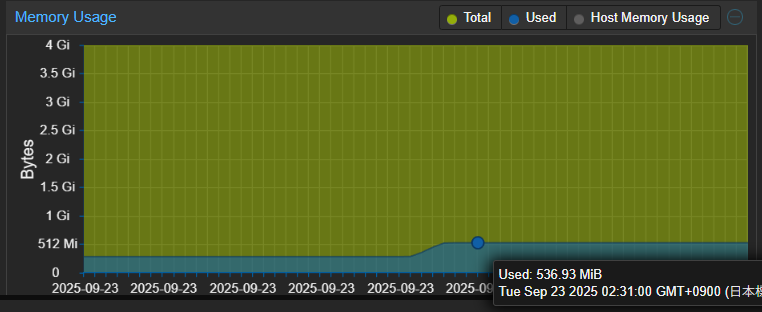
メモリ使用率はProxmox読みで537MiBでした
今回はここまで。フィルターとかAyameとか試したいね